What's New in the Desktop Platform
Following is a summary of some of the latest features to the Windows “desktop” version of cieTrade that we’ve announced over the past few months and a reminder of a few older features that are widely used. For more information, please contact the cieTrade desktop support team at (203) 323-0074 or support@cieTrade.com.
Introducing cieTrade for Gmail
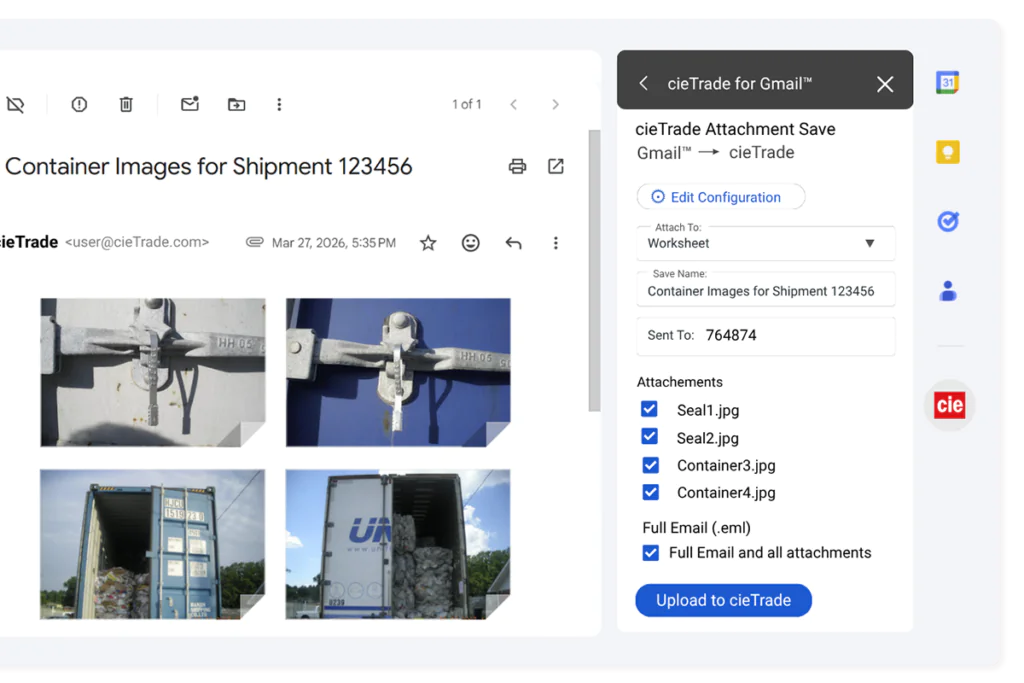
cieTrade for Gmail allows users to capture emails and attachments directly from your Gmail inbox and add them onto corresponding orders or worksheets within cieTrade— making it easier to organize and access information related to your shipments.
While viewing an email, users can launch cieTrade from the tab bar and enter their login credentials to access attachment-saving options. The feature automatically detects the number of attachments in the email, prompts users to select a destination, and enter a worksheet or order number. Users can then choose to either save the full email with attachments or upload the attachments only.
Once uploaded, the email and attachments are automatically linked to the associated cieTrade record found — turning orders and worksheets into centralized, virtual file folders for all related documentation. This improves organization and accessibility while eliminating the need to download files locally before uploading into the system.
Users can install cieTrade for Gmail through the Google Play Store. Fore more information about this feature, please visit our help file or contact our support team.
"New" Outlook Email Add-in
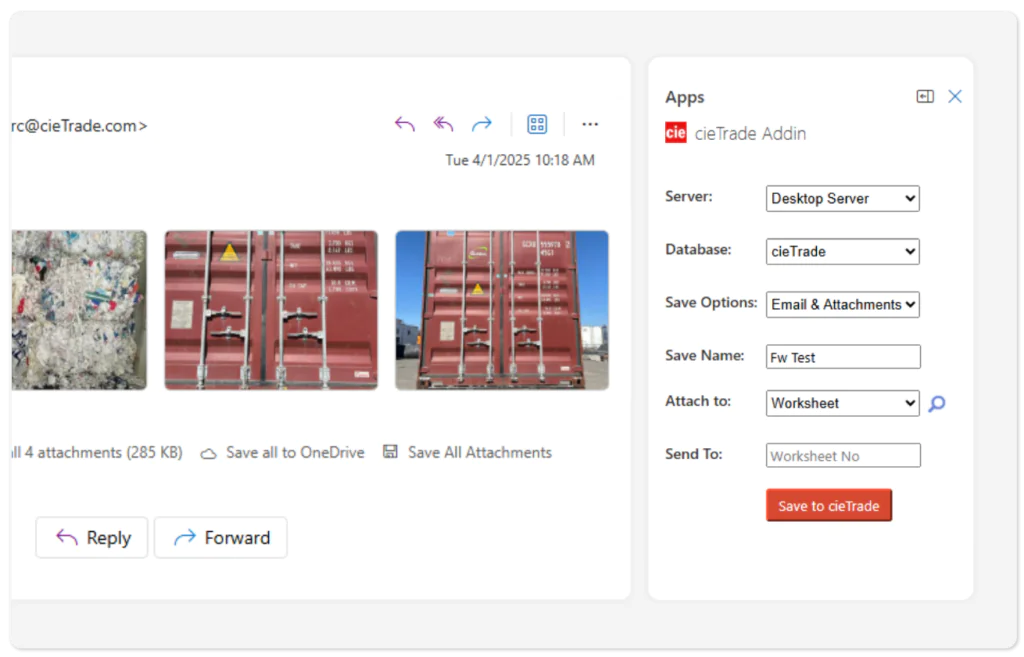
cieTrade’s email add-for Outlook in is one of our most popular tools, simplifying the task of tying documentation to transactions. Last year, when Microsoft announced the “New” Outlook for Windows, we discovered that our existing cieTrade add-in was not compatible with it. In response, for clients who have upgraded to the “New” Outlook, we’ve created a new email add-in that supports this version. New add-in features include:
- Portability: This add-in follows your account. The new add-in is compatible with both web and desktop versions of Outlook for Windows, so there is no need to reinstall if you get a new computer or if you go back and forth between a browser and your computer.
- Appearance: While all the data elements are the same, the new add-in has a fresh, modern look and feel.
- Accessibility: The new add-in text will automatically enlarge with your native text size settings.
If you’re on “Classic” Outlook, you should continue to use the existing email add-in. If you want to upgrade to the “New” Outlook to use the new add-in, it’s important to understand that the switch may need to involve your IT department. Currently, default email signatures are not supported in the new mail window. For more information about the new version of the add-in, please contact cieTrade Support.
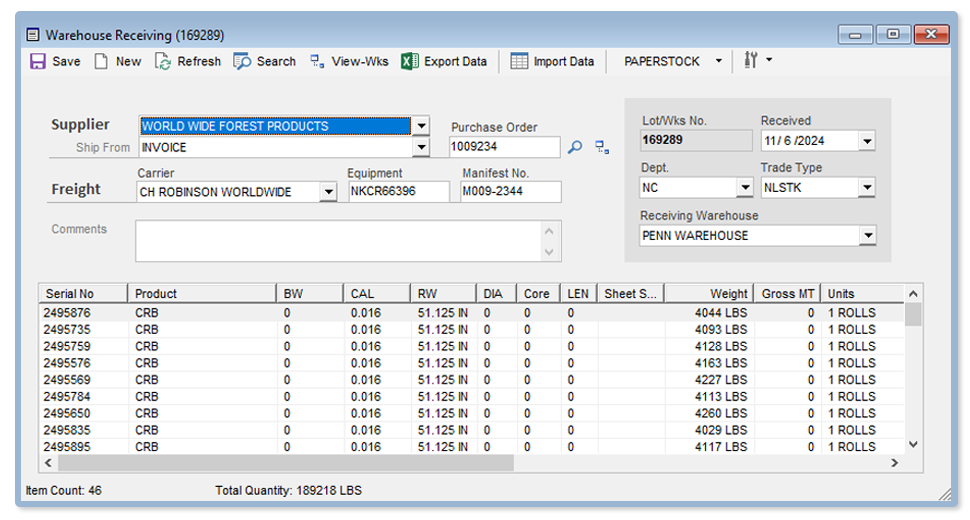
Now available in the latest version of cieTrade, specialized warehouse receiving features for paper stock, previously only offered in the “cieWarehouse” app, are now available directly within cieTrade by activating the new Warehouse-Receiving feature.
This change eliminates the need to use the cieWarehouse application and supports all features and functions previously available in cieWarehouse, including spreadsheet upload, price updates, auto-increment roll numbers and more. It also allows you to drill down to order and worksheet detail, a feature never available in cieWarehouse.
We currently offer support for receiving paper stock rolls and sheets as well as lumber. Scrap plastics support will be available this fall.
For more information, please contact the cieTrade desktop support team at 203-323-0074 or email support@cietrade.com.
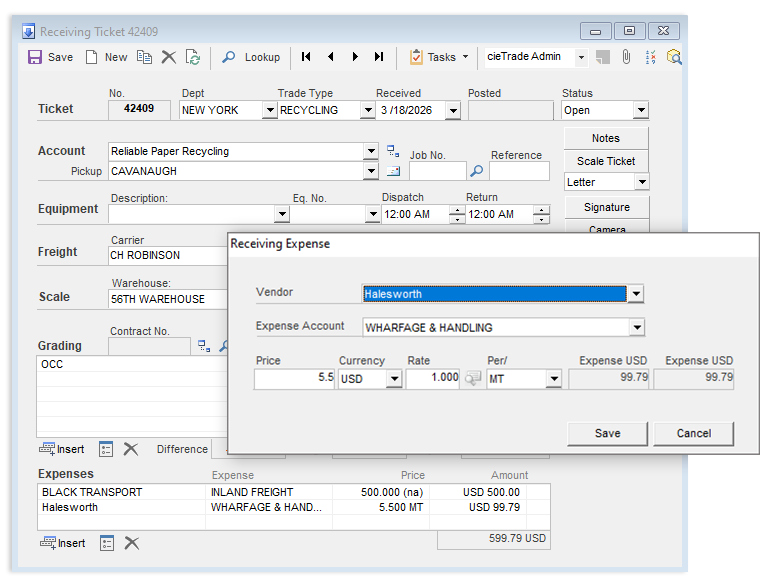
The latest version of cieTrade now includes an expense section on the Receiving Ticket page that allows multiple expenses to be captured and capitalized into inventory. This new feature:
- Supports multiple expenses, eliminating the previous single-expense limit.
- Reduces workarounds by copying expenses directly onto the associated worksheet.
- Supports multicurrency and weight-based (per unit of measure) expenses.
The new Receiving Expense section is an optional feature available in the latest version of cieTrade. It can be activated as a system option under Recycling Plant > General for clients who wish to leverage it. The previous Freight Expense field on the Receiving form remains available to simplify data entry when only a single freight cost needs to be entered.
For more information or to schedule an update, please contact our support team.
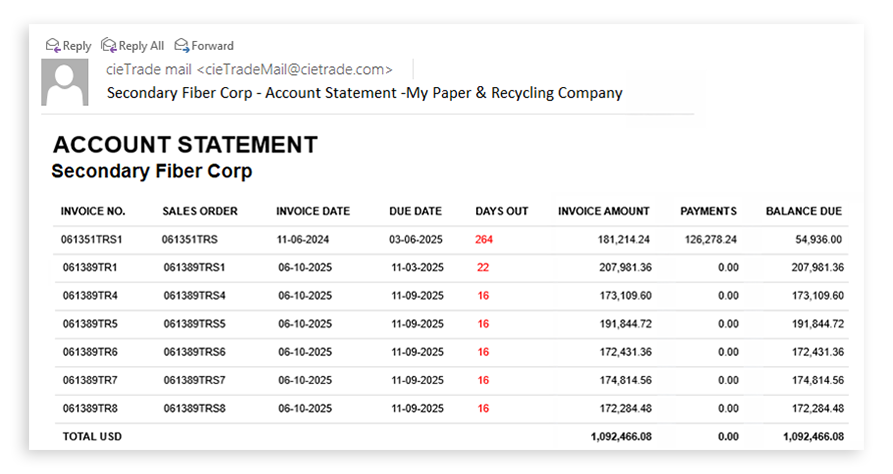
cieTrade now offers an automated, unattended service that generates and emails Account Statements to customers with open balances.
This service can be configured in Counterparty > Defaults, where users can enable Automated Statements for the account and select a weekly or monthly delivery frequency. The service runs once a day, searching for accounts with statements scheduled to be sent. Account Statements can also be manually generated using the Email button next to the Overdue Statement configuration.
Statements are delivered as HTML emails with an optional .CSV file attachment listing all open balances grouped by currency when applicable. While statement templates are predefined, they can be customized for individual clients. Statements are sent to the designated collections contact, or to the primary account contact if no collections contact is assigned. Blind copy (BCC) recipients can also be specified.
After each statement process, cieTrade generates a consolidated status report of all the accounts that received Automated Account Statements. To learn more, please contact our support team.

cieTrade clients seeking alternatives to legacy accounting software can include Microsoft Dynamics 365 as one of the several solutions we offer seamless integration with.
Microsoft Dynamics 365 Business Central is a cloud-based ERP product built for small and mid-sized businesses that connects finance, sales, service and supply chain operations. Our new integration allows financial data generated in cieTrade to flow seamlessly into Dynamics 365, helping teams reduce double entry and manual reconciliation while improving accounting accuracy and operational efficiency.
cieTrade already integrates with several other cloud accounting platforms, including Xero, Zoho Books, QuickBooks Online, Sage Intacct, NetSuite and more. To learn more about cieTrade’s integration with Microsoft Dynamics 365 or other platforms, contact our support team.
clickBale Mobile App Enhancements
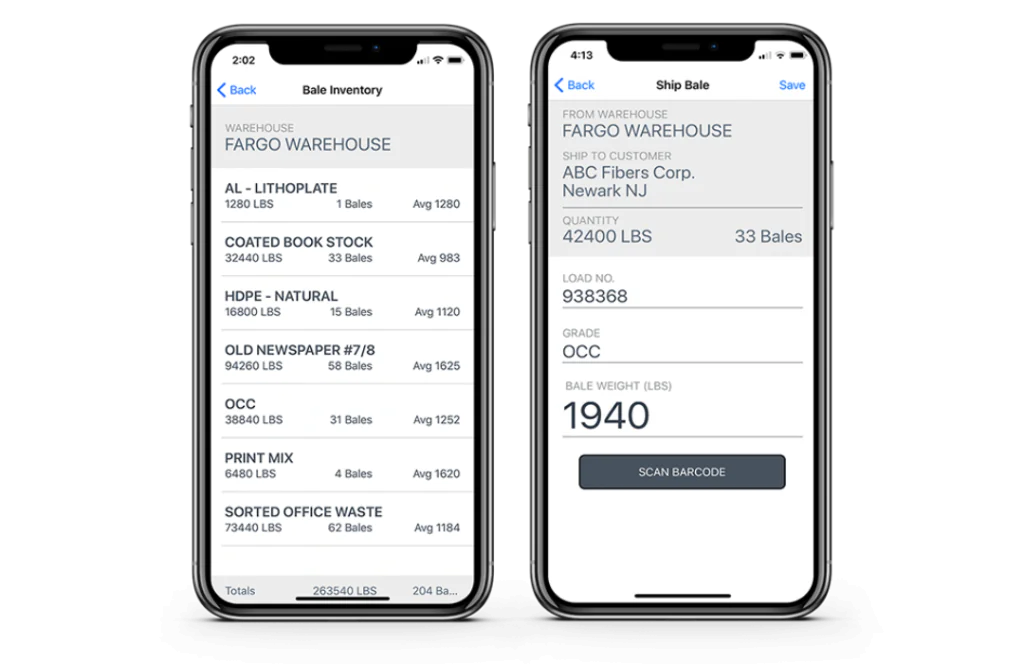
A new version of the clickBale app is available for Apple iOS and Android devices. clickBale is a mobile productivtity app that makes it easier to track live bale inventory directly from your warehouse floor. It helps maintain an accurate floor count based on live plant activity while providing real-time insight into material that is available to be sold or shipped.
With clickBale, users can record newly produced or received bales from their mobile device– eliminating the need for paper tickets and manual tally sheets. Custom barcode labels can be printed through a Wi-Fi or Bluetooth connected printer and applied to each bale, making it easier to identify inventory. As material is packed for shipping, users can easily scan bale tags or manually record the number of bales that are shipped. Once shipments are completed, load details are recorded in your recent activity history and the floor report is automatically adjusted.
Additional enhancements include:
- Barcode scanning support and printing via WiFi or Bluetooth connection.
- Equipment selection on the receiving and shipping pages.
- Barcode label editing and reprinting.
- Coming Soon: Send loading slips directly from the shipping page.
clickBale users can update the app through the Apple App Store or Google Play Store. If you’re currently not a clickBale user, please contact our support team to learn more or to get set up for access.
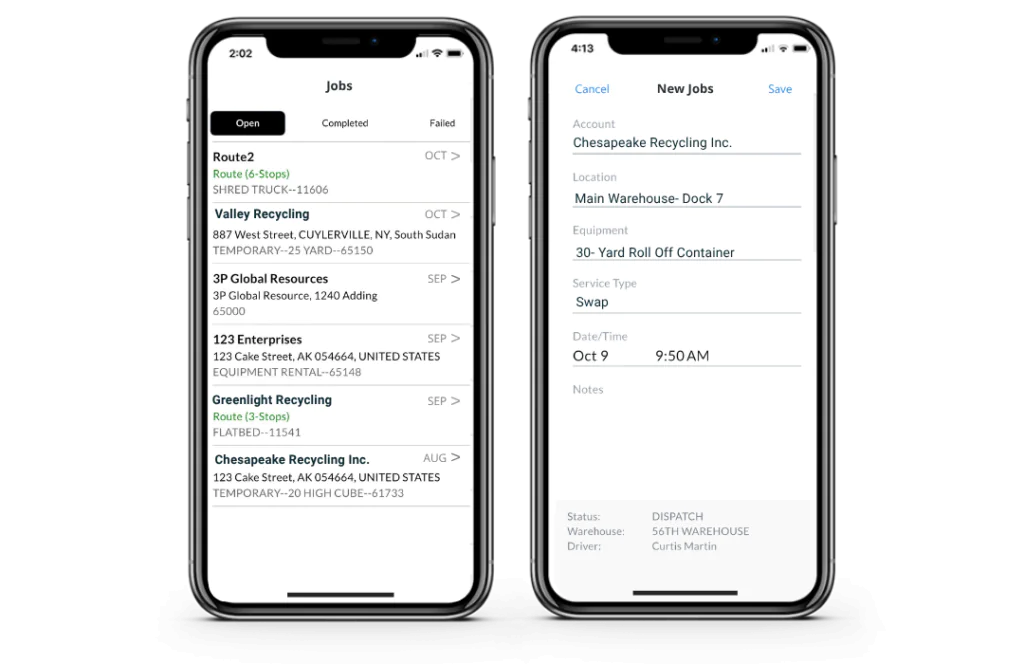
cieDispatch App to Help Haulers Track Service Requests in the Field
cieDispatch helps haulers manage assigned service requests for equipment, containers and material drop-offs directly from their mobile device. Drivers can view jobs and route stops, access drop-off instructions and get directions to service locations.
While in the field, drivers can update a job status, capture photos and signatures, record notes and more. Updates are instantly available in cieTrade, helping the back office update assignment changes and track completed or failed services. cieDispatch is available for Apple iOS and Android devices.
Fully Customizable Shipping Documentation
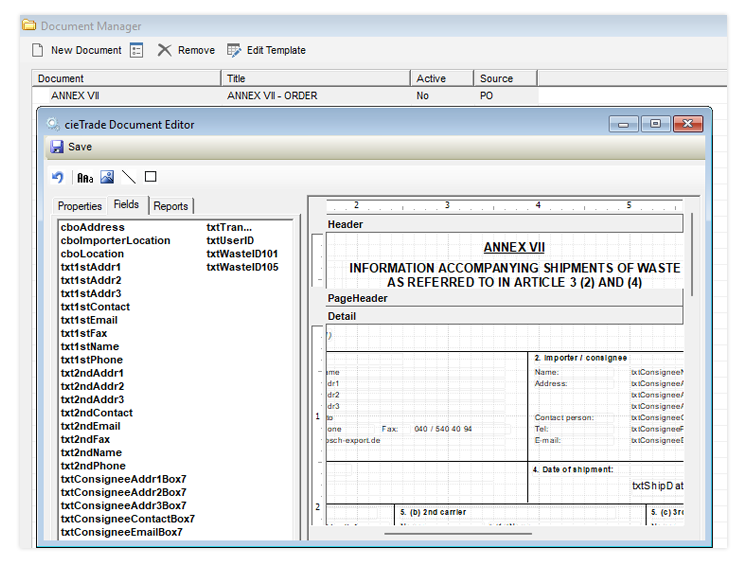
cieTrade’s Custom Document Model replaces the existing document module and allows users to modify most documents in the Documents tab of Orders and Worksheets. Each customizable document has its own template that can be edited through Document Manager, allowing users to tailor documents to their industry or business requirements. Clients interested in the Custom Document Model can contact our desktop support team.

Submit BL Instructions to Steamship with
Infor-Nexus
Infor-Nexus is one of the leading supply chain platforms for global trade and includes most of the world’s ocean carriers as active participants on their network. With cieTrade’s integration to Infor-Nexus, clients can directly submit shipping instructions electronically to steamship lines, often resulting in waived/lower documentation fees.
Create Bookings from cieTrade Directly with
Ocean Carriers
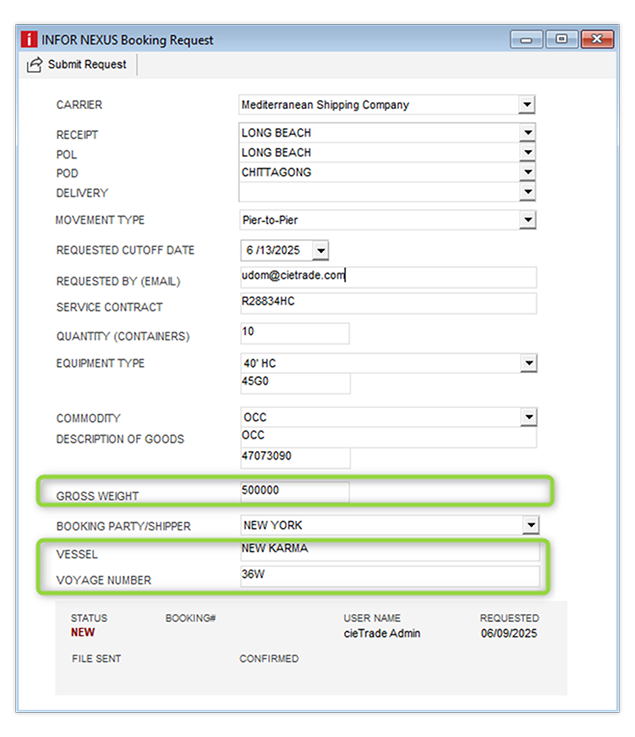
cieTrade allows users to submit booking requests to ocean carriers through the Infor-Nexus network. When a carrier confirms the request, a booking is automatically created in cieTrade. Carrier updates, including cut-off date and ETA changes, are reflected in the booking sheet, reducing manual entry and helping your team keep shipment details current. To use this feature, clients must be registered with Infor-Nexus and have existing rate contracts with their selected carriers. Please contact support@cietrade.com for further instructions on how to get registered.
Automated Booking ETA Update Service
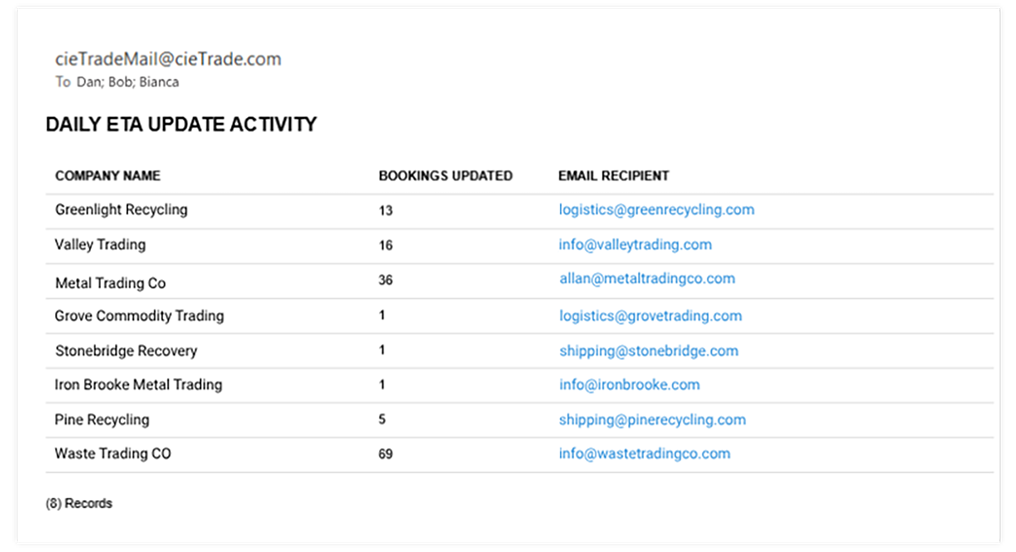
cieTrade’s Automated Booking ETA Update Service helps exporters receive daily email updates on estimated times of arrival (ETAs) for ocean bookings. This feature is an extension of cieTrade’s existing support for international trade, which includes electronic BOL submissions, automated booking requests and confirmations through our longstanding partnership with Infor-Nexus. Clients interested in the Automated Booking ETA Service can contact our desktop support team.
Automated SED Filings with Census Buraeu
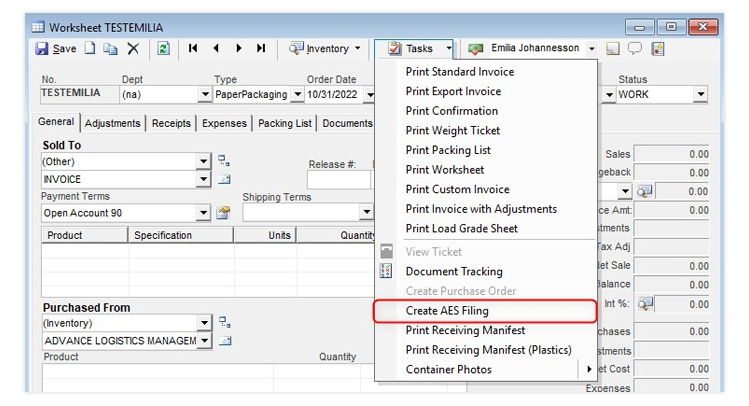
cieTrade’s AESDirect integration allows clients to create an export filing directly from an Inventory Shipping Worksheet and transfer shipment data to AESDirect. This helps reduce manual entry and makes it easier to prepare the export information needed for filing. For more information, Please contact our desktop support team.